Home → Apps
Apps
Ask for an invoice ledger, a landing page, a JSON API or a web app with accounts, and get a real one: started from a template in seconds, built by one agent following a written plan, verified in a real browser whatever its stack, and deployable from the files it carries. A chat answer disappears into scrollback; this is a directory you can open, diff and run.
Since v0.14.0. Mini Apps became Apps. Off by default — turn
the host on under Settings → Apps, which takes effect immediately. Everything
below is in the web portal's Apps screen and in the CLI as
/app.
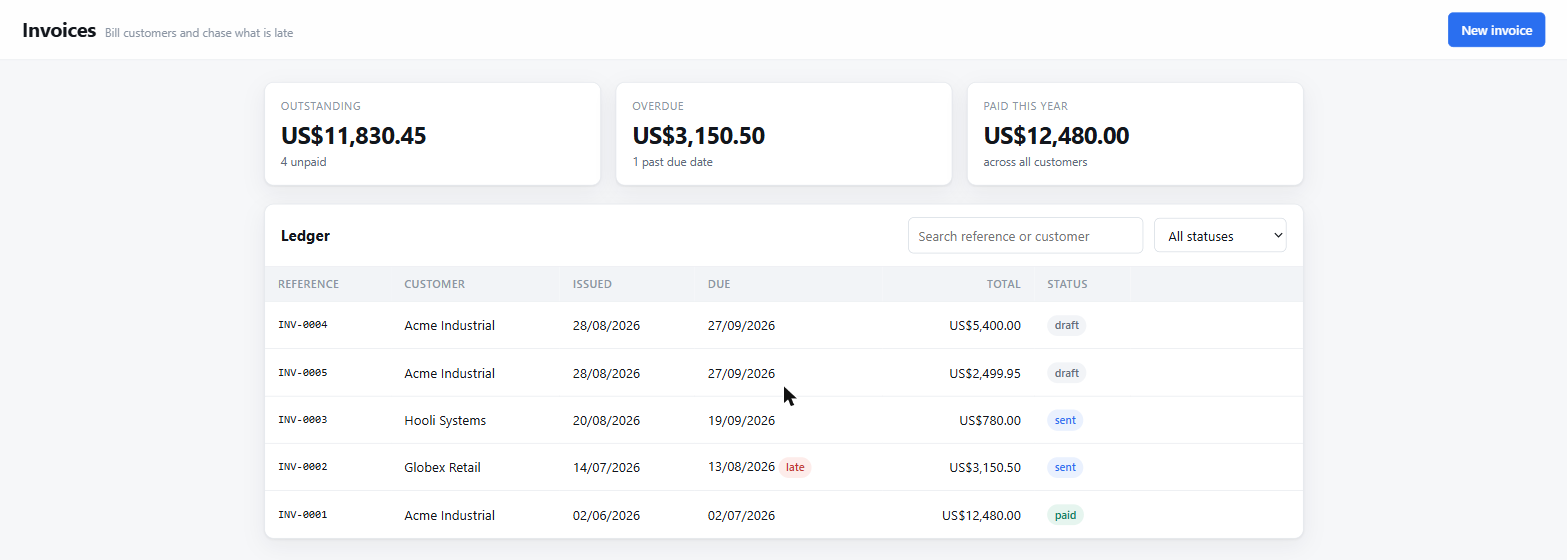
page-records template.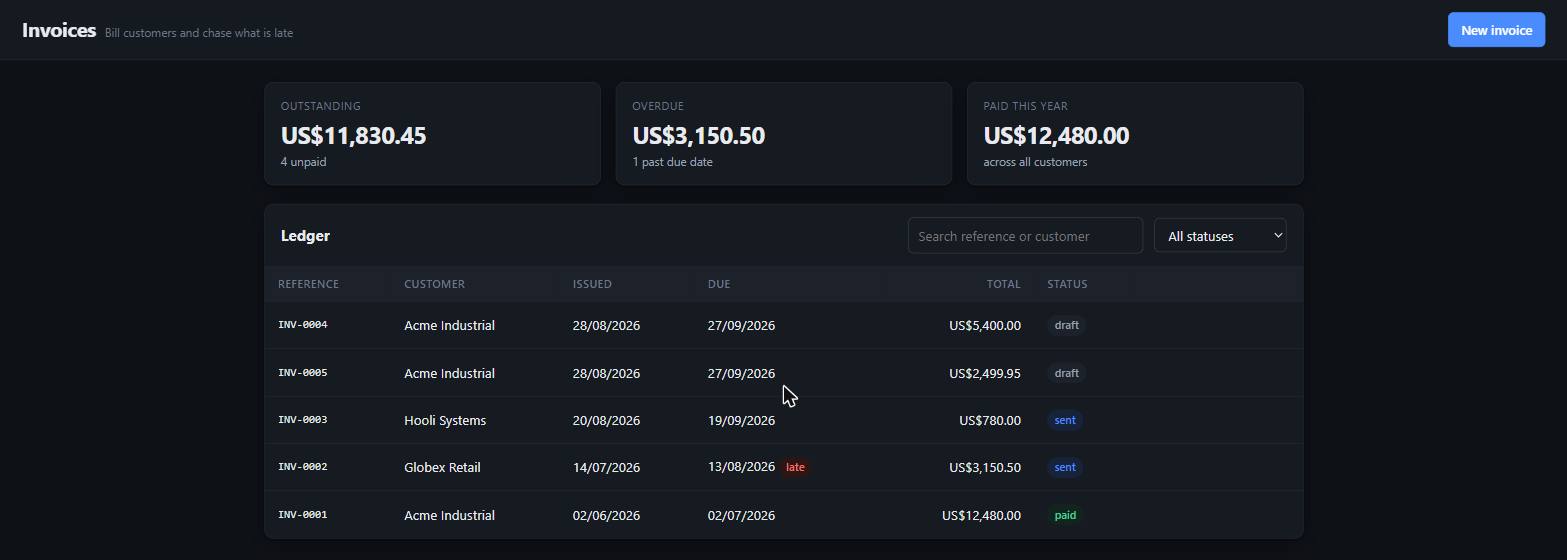
Templates first
An app starts from a template, not from a blank directory and two thousand tokens
of instructions. A template copies in as files — nothing is generated — and every
one carries a worked feature end to end, tests, a Dockerfile, and a short
AICO.md written for the agent: what the app is, how it is laid out,
and what to copy for the next feature. Eighteen ship today — nine for Node, five more stacks, a React frontend and three system bundles:
- page-records — a one-screen tool over the shared SQLite host: summary strip, table, form, two-step delete. Nothing to install; serving the moment it is saved.
- landing-static — hero, features, pricing, FAQ, contact. Plain HTML and CSS, a strict content-security policy, and an nginx image.
- api-service-hono — a JSON API on Hono and Node's built-in SQLite: typed routes with field-level errors, an OpenAPI document, health and readiness, tests that run the app in memory, a multi-stage image.
- web-saas-next — Next.js App Router, Tailwind, node:sqlite, sign-up and sign-in with a signed cookie, an items feature from page to database to test, a standalone image.
- dashboard-next, docs-astro, cli-node, agent-service-node, mobile-expo — a metrics dashboard, a documentation site, a command-line tool, an LLM agent service, and an Expo app with a web preview.
- api-service-fastapi (Python 3.14, FastAPI, SQLAlchemy, Alembic, uv), api-service-spring (Java 25, Spring Boot 4, Modulith, Flyway), api-service-dotnet (.NET 10, minimal APIs, EF Core), api-service-go (Go 1.27, standard library, pgx, sqlc), web-app-laravel (PHP 8.5, Laravel 13, Livewire) — each with a worked items feature, Argon2id passwords with pinned parameters, problem-details errors, an OpenAPI document, 95%+ test coverage, a clean dependency audit, an SBOM, a hardened non-root image and CI. web-app-react is a typed-client frontend (Vite, React 19, TanStack, Tailwind) that talks to any of them through a same-origin session cookie.
Your own templates go in ~/.aico/templates/<id>/ or a project's
.aico/templates/; the later shelf wins by id. A template is a directory
with a template.json naming its kind, category, run commands, deploy
targets, the words a brief would use for it, and what it ships.
Describe it first
Create app opens on one question: what do you want to build? As you type, the templates are ranked against the answer — plurals folded, phrases such as "sign in" matched whole, what a template is for weighted over what it is made of — and the best match is named with the words that matched, along with a name for the app taken from the brief. See all templates opens a gallery with search, category chips and what each one ships; Let the agent choose and start hands the brief to the agent with the catalogue. Whichever way, the brief becomes the first message of the conversation, so the agent plans from your words and not from a template's.
The app beside the chat
A conversation bound to an app shows the app on the right. The Preview
is the app itself, framed at desktop, tablet or phone width, reloaded when a turn
ends; the app host allows exactly one framer, the portal's own origin.
Backlog reads .aico/backlog.md — a progress bar, the
stories with their Done when lines, and the next one a click from being
built. Decisions is the file compaction keeps, Files
the app's tree with any file readable in place, Logs the process and
deploy output. Start, Stop, Deploy and Open sit in its header; the panel resizes,
hides to a strip, and remembers both. The agent knows all of this: the built-in
app-platform skill describes the kinds, templates, tools, gates and the
panel the person is looking at, and the first turn on an app points at it.
Four kinds, one screen
A kind is how the app runs, not which framework it uses. page and static are served by aico's own host on a port of their own — a different origin, so generated code cannot reach aico's API. A process app has its own server, started and stopped from the screen, installed the first time in the background while you type the brief. A cli has nothing to open; its tests are its check.
What is not contained: a process app runs code the agent wrote with your permissions, on a port of its own. Its environment has every key, token and password stripped by pattern, and it cannot reach aico's origin — but it is the trust you extend to any repository you clone and run, not a sandbox.
One agent, a written plan, and a gate that opens the app
There is no build team of role-playing sub-agents; the measured result of those was
three to ten times the tokens for worse coordination. One agent builds. The
app-plan skill turns a brief into a one-page PRD and a backlog of
vertical slices, each with a Done when the browser can check;
app-architecture decides where a feature lives before it is written;
app-design says what a screen people pay for looks like — one shell, a
hierarchy, tokens, real empty and error states, proven at 1280px and 390px;
app-ship makes it runnable from a clean clone; app-quality
proves it with a check per requirement in your words — steps and an expectation,
not a click. Investigate is the
only fan-out — read-only research, never writing.
Whatever the stack, the turn cannot end as finished until the app was opened. A
source write under a process app registers it; a passing VerifyApp verdict
against its origin clears it; a later write makes that verdict stale. When the app is
not running the gate says so and names the command. The project's own checks — from
.aico/profile.json, which remembers the commands that worked — must be
green first.
Deploy from the files it ships
Every process and static template carries a multi-stage Dockerfile, a
compose.yaml, an .env.example, a health route and a
deploy/ folder with the exact command per host. Deploy on
the card runs the app's own script and shows its log; when the tool it needs is not on
this machine, the answer is a sentence, not a failing build. aico holds no cloud
credentials and ships no cloud SDK — a stateless process with one volume for data is
what makes the same image run on Fly, Render, Railway, a VPS or Kubernetes.
Apps do not send SQL
For page apps the shared host builds every statement: the page names a table and passes values, identifiers are checked against the schema that actually applied, and every value is bound. There is no path from a string in the browser to a token in a query.
await aico.db.list('invoices', { where: { status: 'sent' },
                              orderBy: 'issued_at', direction: 'desc' })
await aico.db.create('invoices', { customer: 'Acme', total: 1200 })
await aico.db.update('invoices', id, { status: 'paid' })
The shape on disk
<workspace>/miniapps/<slug>/
  app.json            kind, category, template, run and deploy profiles
  AICO.md             what the agent needs to know — inlined into its prompt
  .aico/backlog.md    stories, ticked as they land
  .aico/decisions.md  what was decided and why; survives compaction
  .aico/profile.json  the commands that work, with provenance
  docs/EXTENDING.md   the worked feature to copy
  Dockerfile  compose.yaml  .env.example  deploy/
From the CLI
/app templates a SaaS with accounts and billing
/app new web-saas-next "Invoice Desk" --brief "Invoices with customers and PDF export"
/app list
/app start invoice-desk
A plugin, off by default
{
  "miniApps": {
    "enabled": true,
    "port": 7318          // default: one above the aico server's
  }
}
Off means the model cannot see the tool at all — not that it is asked not to use it. The setting key keeps its old name so nothing you configured changes.
Tested where it matters
Every shipped template is instantiated in the test harness and checked for its manifest, notes and backlog; the two process templates are installed from their lockfiles and put through typecheck, lint, test and build before a release; the host is exercised over real HTTP with a restart in the middle; the create, run, deploy and profile routes are driven against a real server on a scratch store; and the Apps screen, the describe-first wizard and the panel beside a bound conversation — the framed preview, the backlog's next story, the files, the phone width — are measured in a real browser. Before a release, a live probe builds a whole app with a real model — template, plan, stories, a rating kept as a lesson, a steer, a deploy — and opens every screen of the result at two widths; another scores the five app skills against their tasks.